
LOCAL · NO CLOUD · NO ADB

Real-world eyes for your PC AI agent

A local MCP bridge for your Android phone — so Claude Code, Claude Desktop, Codex, or any AI app that speaks MCP can use its camera, photos, and sensors, and move files & clipboard both ways. All over your own Wi-Fi.

uvx onsense pair

Needs uv (curl -LsSf https://astral.sh/uv/install.sh | sh) and the onSense app on your phone. No uv? pipx install onsense.

Get the Android app Star on GitHub

Not "drag a photo in." Your agent asks for a live frame the moment it needs one — hands-free, without leaving the loop. Plus sensors and files.
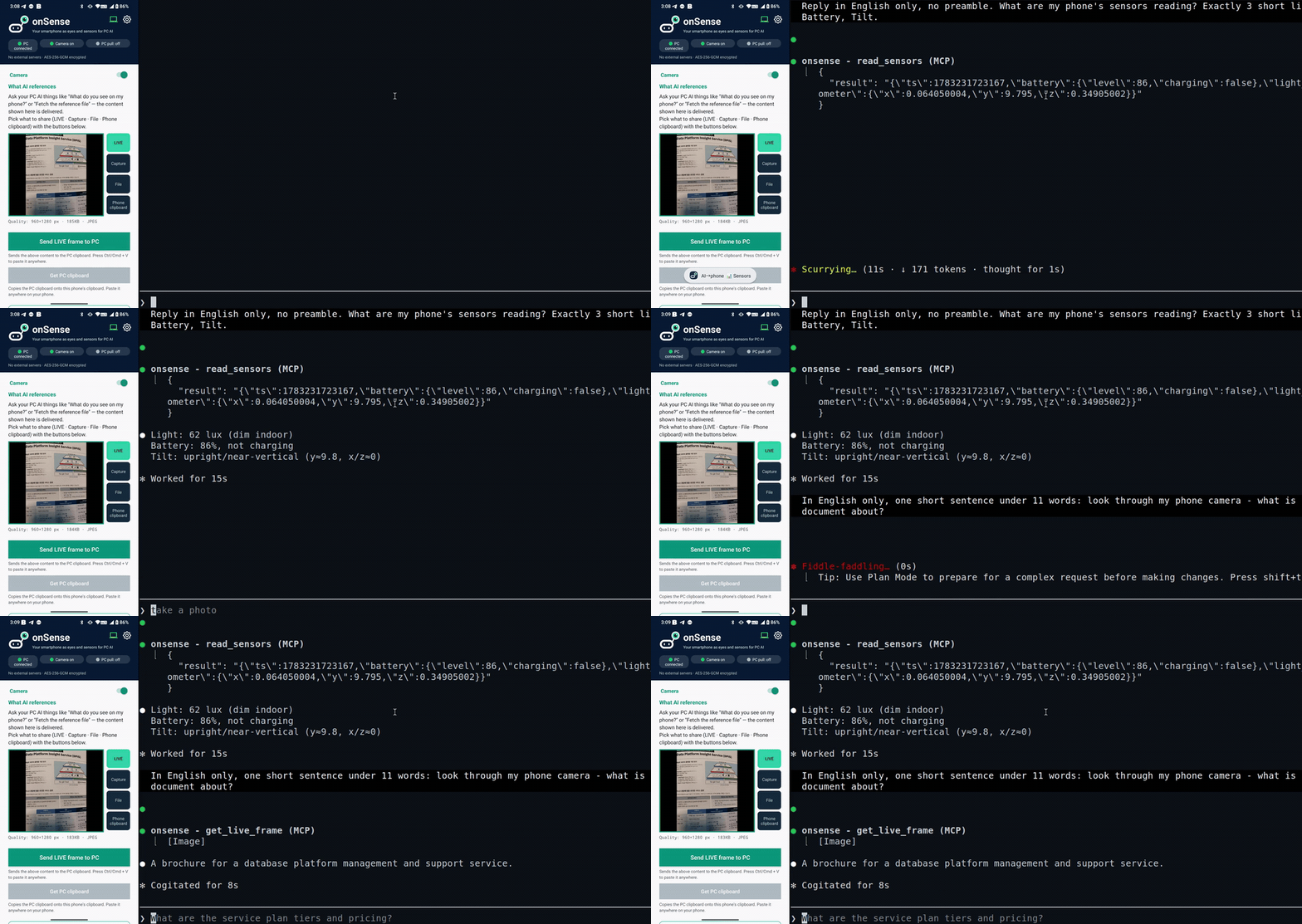
Left: phone live view. Right: PC CLI where Claude reads the phone's sensors and camera through onSense.
Left = phone live, right = the PC CLI — recorded simultaneously, not a reconstruction. The real round-trip over local Wi-Fi.

Paired in under a minute

No ADB, no cloud, no account. One command on the PC, one QR scan on the phone.

Before you start: install the onSense app on your phone, and get uv on your PC (curl -LsSf https://astral.sh/uv/install.sh | sh, or pipx install onsense). Phone and PC must be on the same Wi-Fi.

1

Pair

Run uvx onsense pair on your PC — it prints a QR code and auto-registers the MCP server. (You have ~3 min to scan.)

2

Scan & restart

In the onSense app, tap Scan PC QR. Then restart your AI client once so it loads the onsense tools.

3

Ask your AI

“What do you see on my phone?” — delivered to Claude, Codex, or any MCP client. Stuck? Run uvx onsense doctor.

What developers point it at

onSense is a real-world input device for a PC agent — not a consumer AI camera.

🔌
Circuit boardsRead LEDs, labels, wiring
📄
Paper documentsPoint & ask, no scanner
🏷️
Product labelsModel, serial, specs
📟
Device panelsMeters, error screens

Start with the split-screen demo above, then point the phone at your own desk, document, label, or device panel. More short use-scene clips will be added after the first public user reports.

More than a camera — a two-way file & clipboard bridge

Move files, images, and text between phone and PC with no cable and no cloud — and let your AI read what you send.

Phone → PC push

Send a photo, document, video, or clipboard text straight to the PC — saved to disk, and pasteable with Ctrl+V.

PC → phone pull

Opt-in: the phone grabs whatever is on the PC clipboard — files first, then images, then text.

Your agent reads it

A pushed file becomes an MCP reference your AI can open and reason over — not just images.

Works with your client

Not just coding agents. onSense is a standard stdio MCP server, so it works with any MCP-compatible AI — Claude Code, Claude Desktop, Codex, or your own agent. The client just runs the server locally on the same Wi-Fi as your phone (a cloud-only web client can't reach it).

Claude Code

Pairs, registers the MCP server, and installs the /onsense slash command — one line.

uvx onsense pair

Codex

Add the server once (after pairing). Verified on Codex CLI 0.142.5. Codex sandboxes network by default — allow network access so it can reach your phone.

codex mcp add onsense -- uvx onsense serve

Claude Desktop & others

Any MCP client works — add the stdio server to its config (run pair once first for the token).

{ "mcpServers": { "onsense": { "command": "uvx", "args": ["onsense","serve"] } } }

Private by design

Your phone talks only to your own paired PC. There is no developer-operated cloud.

No cloud relay

Phone ↔ PC only, on your local Wi-Fi. No developer servers.

AES-256-GCM encrypted

Payloads encrypted; requests HMAC-SHA256 signed with replay rejection.

You're in control

Camera runs only while sharing, with a persistent notification and an on-device access log.

Launch status

onSense is early, local-first software for developers and power users. The PC bridge is public; the Android app is rolling out through Google Play.

PC bridgePublished on PyPI and the official MCP Registry. Install with uvx onsense pair.
Android appSubmitted to Google Play production review. If Play is not visible in your region yet, use the GitHub README for current status.
Feedback wantedOpen an issue with the scene you tried, your OS, Android model, and where pairing or tool calls failed.